



Never Miss a GEBRA™ Update: Introducing New Feature Notifications
GEBRA™ has continuously added new features and improved existing ones. But one important question remained:
“Were users fully aware of GEBRA™’s changes?”
The Problem: Updates That Slipped Through
Previously, new features were either deployed without in-app notifications or announced only via email. As a result, users often missed when features were added, what changed, and how these updates could help their actual work.
This post marks the beginning of the GEBRA™ New Feature series, born from this concern. It also explains how GEBRA™ will communicate new features moving forward.
Use Guide vs New Feature: What’s the Difference?
If you’ve been using GEBRA™, you might have checked the existing User Guide series to learn about GEBRA™’s basic features and usage.
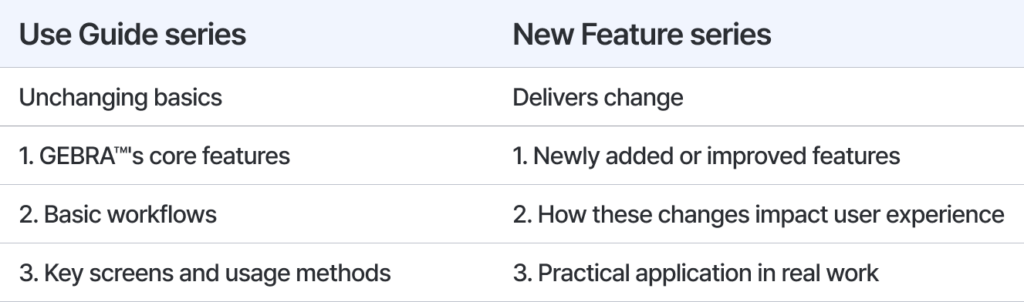
Check out the Use Guide series >
GEBRA™’s New Update Communication System
With this release, GEBRA™ introduces New Feature announcement popups and history viewing functionality.
When important new features are deployed, users now see them immediately via popup upon entering the Dashboard. No need to check emails or browse announcement pages.
This isn’t just a “feature added” notification. The system is designed to convey:
- Why this feature was added
- What has changed
- How to utilize it effectively
From Email-Centric to In-App Communication
While email-based announcements were effective for information delivery, they were disconnected from actual usage flow.
The New Feature notification system is designed for users to recognize changes at the moment and within the context of actually using GEBRA™.
Through this system, GEBRA™ aims to:
- Increase awareness of new features
- Communicate the context and value of feature changes
- Help users better understand and actually utilize features
Updates That Don’t Disappear
New Feature popups operate flexibly based on user choice:
Click Close only → Same notification reappears on next Dashboard visit
Select Don’t show again → Popup stops auto-displaying for that feature
However, choosing “don’t show again” doesn’t make the announcement disappear forever.
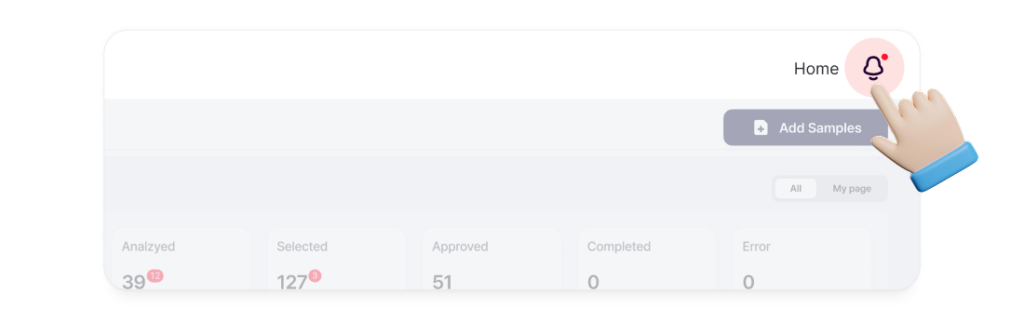
Through the Bell icon in the upper right of the Dashboard, you can revisit all published New Feature posts anytime.
In other words, new feature announcements aren’t one-time alerts but accumulated history.
The Beginning of New Feature Series
This post marks the start of the New Feature series. Going forward, GEBRA™’s major feature updates will be communicated through:
- New Feature popups
- Notification history within Bell icon
- New Feature series blog posts
GEBRA™ doesn’t stop at simply adding features. We believe it’s crucial to clearly communicate what these changes mean to users.
Through the New Feature series, watch how GEBRA™ continues to evolve as a better clinical decision support tool.

3billion Inc.
3billion is dedicated to creating a world where patients with rare diseases are not neglected in diagnosis and treatment.